Showing posts with label Internet. Show all posts

Tuesday, February 8, 2022

DTN-IPN New Node - Moon Rover

I was looking at my inventory of development boards and found that I had an extra Raspberry Pi 3B with the camera module. The camera is one of the early versions featuring the OV5647 image sensor.

I thought "I can use this setup to create another DTN node for the Lab prototype, what about a Moon Rover ?"

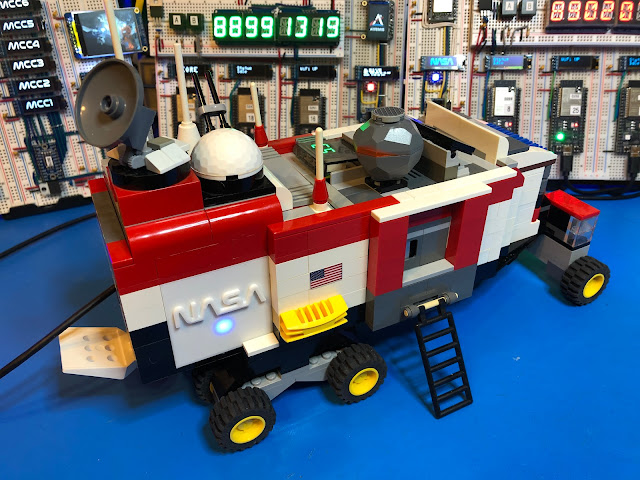
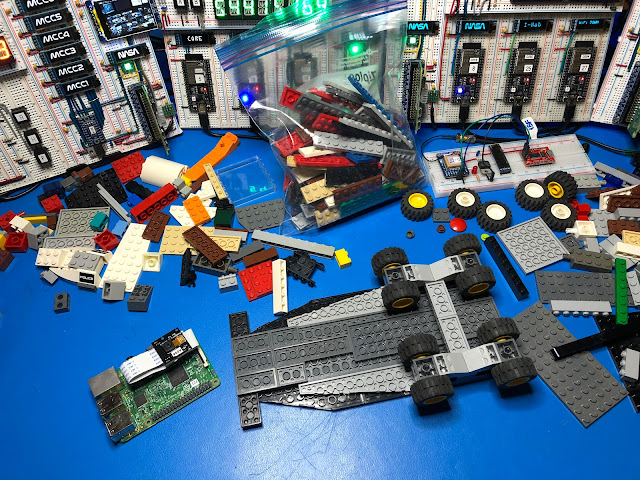
At first, I was thinking just to keep it in its original plastic case but then I realized that we have a bunch of Legos that our kids are not using anymore, so how about putting something together that looks like a lunar vehicle and can fit the Raspberry Pi, the camera and why not some lights and a battery.


I always had fun building stuff with Legos, I remember when I was a toddler in Argentina my Grandma use to take often to the “Rasti Club,” Rasti was another brand of building blocks available in Argentina at the time. I spent hours and hours building all sorts of gizmos.

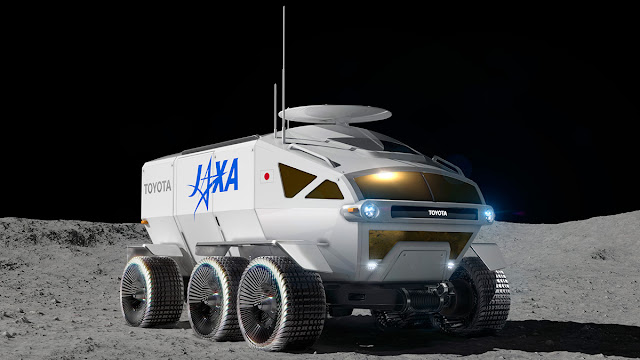
Obviously, this model is just something I put together with what I had at hand, nothing that looks like a real rover or some of the Lunar vehicles under development like the JAXA/Toyota “Lunar Cruiser” for the Artemis mission.

Picture Courtesy of JAXA

I was thinking about using one of the Lego design tools, but that was an overkill for this project. This could be a good idea for putting a contest or challenge together for students to design a Lego Lunar Rover that can accommodate the Raspberry and the camera. 

A Raspberry Pi Zero W 2 would also work and will take less space, but they are currently in short supply.

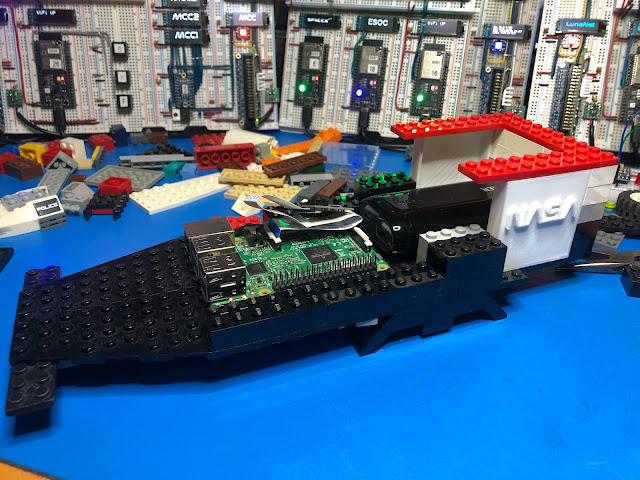
Let’s get started, with the parts I was able to “recycle” I started building sort of the chassis for the rover, taking in account of the size of the Raspberry Pi and enough height to fit the camera.

I 3D printed a pair of blocks with the NASA worm logo, the model file for it is available here.

I had to figure how to wire the Neopixels for which I used two channels on the Raspberry Pi, one on GPIO10, and the other one on GPIO21. Since I didn’t want to overload the onboard 3.3V power supply on the Raspberry Pi, I added an LDO regulator (Microchip TC1262) to get the 3.3V for the Neopixels directly from the 5V power supply.
I used wirewrap wire, and two small pieces of prototype pcb.


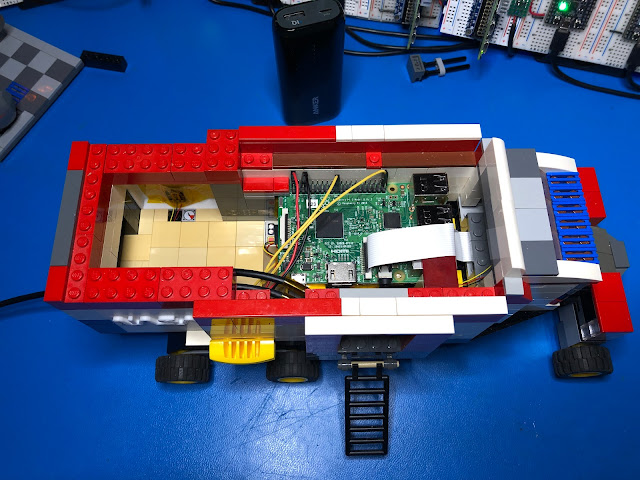
Quick test to confirm everything was working and putting the Raspberry Pi in place, connecting the camera flat cable and closing up.


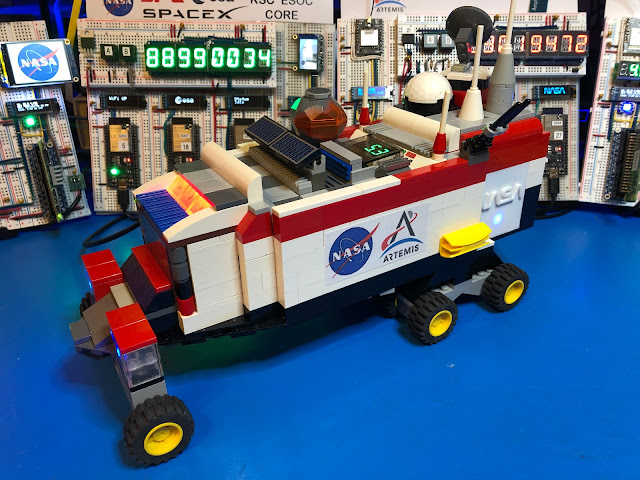
Here is how the complete model looks from the left side


Right side look


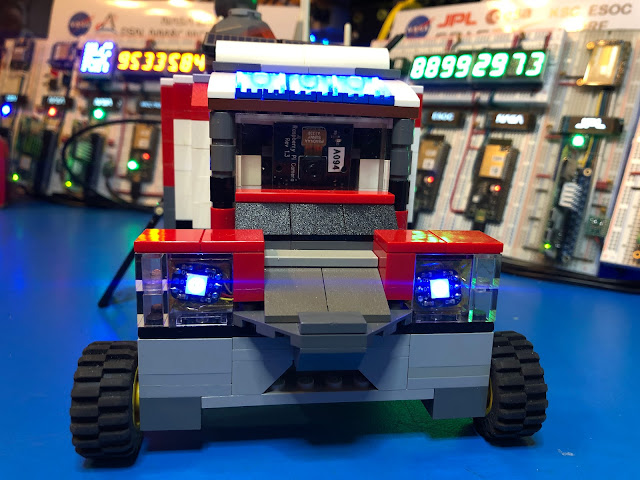
Front with the camera module visible behind a transparent Lego block


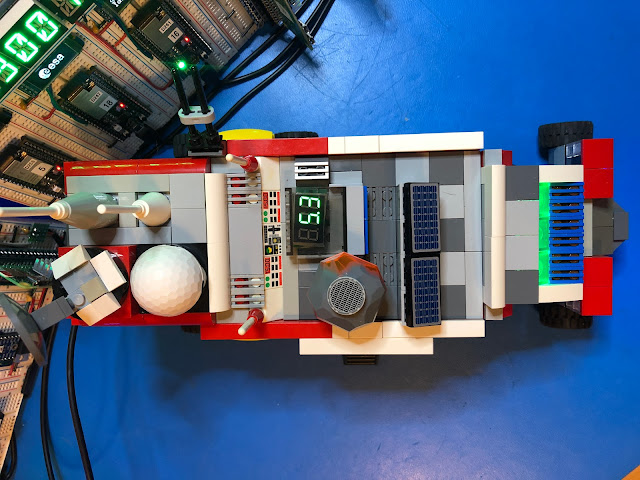
And the top, with a last-minute addition, a volt meter to measure input/battery voltage.


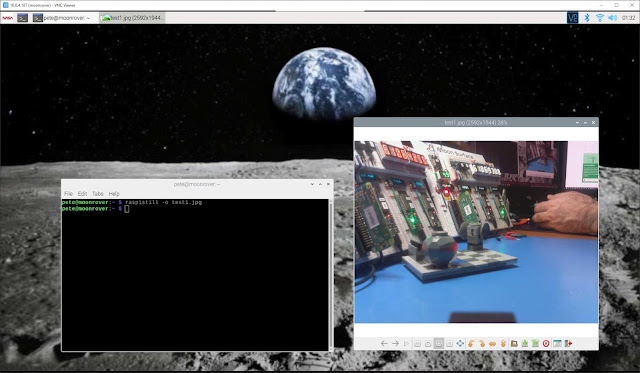
Connecting via VNC. Only thing that I was required to do to make it work was to enable the Camera interface with raspi-config, after that took the very first picture using raspistill.


My plan is to write a script using Pyion to wait for a command to start taking pictures, store them in some spool directory and then wait for another command to start transferring them to a DTN relay with final destination, one of the nodes that have a TFT LCD display to show the images captured by the rover. All transfers using NASA’s JPL ION implementation of Bundle Protocols.

And of course, there is a video with a walk through and the blinking lights 😊

Once again if you are interested to learn more about this project, DTN and InterPlanetary Networking you can join the Facebook Group I created, and you can also join IPNSIG (ISOC InterPlanetary Networking Interest Group.)


Cheers
Jorge

Thursday, January 27, 2022

DTN-IPN R&D Lab Prototype Update

Happy New Year!!

Since my previous article on December 2021, I made some changes to the original design of the IPN-DTN Lab prototype that continues to be very much a work in progress project.


From the previous version I added two more nodes running on a Raspberry Pi Zero W 2, I expect in the future to add more as they become available, they are currently in short supply and are hard to procure.

There is a Raspberry Pi 3B+ with the sense hat also running Raspi OS and ION 4.1.1 that I use for testing code. And another two Raspberry Pi 3B+ running a complete different implementation of DTN called IBR-DTN from a University in Germany (more about it soon.)

I rearranged the nodes on the breadboards, and now the one implementing some of the functions of a Mission Control Center (MCC) has more displays, taking advantage of an eight channel I2C switch from Texas Instruments, the TCA9548A. With this switch it is possible to drive the seven 128x32 OLED displays that are associated with this node using a single I2C channel.

Also, on the MCC node I have now a 2” 320x240 IPS TFT LCD display, it uses the ST7789 TFT driver that can display full 18-bit color. The display module is connected to the SPI interface on the Raspberry Pi.


There is a new node implemented with a Raspberry Pi Zero W 2, I named it NASA-JPL, this node features also a 1.14” 240x135 TFT Color LCD mounted in portrait mode using the SPI interface of the Raspberry Pi.

The idea is that at some moment those displays will show images transferred over DTN using Bundle Protocol, like pictures taking by a rover on the surface of the Moon  (future node to be added using a Raspberry Pi with a camera), transmitted to a local relay node and from it through the Space Network to a ground station, and then through the Ground Network to a screen on JPL and/or MCC, all using Bundle Protocol.


On the previous version I was using independent power supplies for the Raspberry Pis, wiring was getting ugly and complicated. I replaced them all by single 5.1V 15A power supply, I had to put together some sort of power distribution adapter going to each of the breadboards where the Raspberry Pi are mounted.

If you have a good eye you will notice some LDO Voltage Regulators to step down from the 5V power supply to 3.3V required by some parts, particularly displays.

While on some nodes I can use the 3.3V generated by the Raspberry Pi Zero W2s, with the alphanumeric LED displays and too many OLED I was drawing too much power, then now some nodes have their own 3.3V LDO regulator.

I keep “the lab” running 24/7 monitoring power and some key signals, so far it has been reliable after I fixed the power distribution issues.

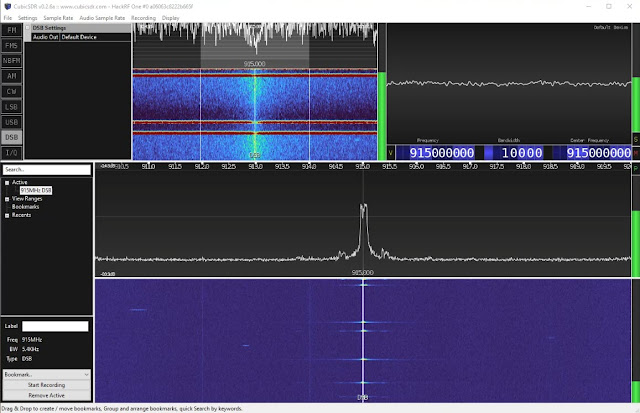
I took a Hack RF SDR I had in a box to check on the transmission signal levels of the LoRa modules, they are as expected centered on 915MHz, while they are low power modules, the signal can reach a hundred feet or more with a data rate of about 500bps, almost three times faster than Voyager 1, well the thing is 23+ Billion Kilometers away 😀😀😀.


On the software side I have a lot of work to do. Now I have all nodes running the same version of Raspi OS, they all have Circuit Python installed, NASA JPL ION 4.1.1 and all have Pyion 4.1 which is a Python programming interface for ION, so putting together a message to be sent over the DTN is simple as

import pyion 

proxy = pyion.get_bp_proxy(1)
proxy.bp_attach()

with proxy.bp_open('ipn:82.1') as eid:
    eid.bp_send('ipn:82.1', b'hello')


There is obviously and updated “Blinking Lights” video showing all the nodes running and some of the VNC screens from nodes, showing for example real time data from a GPS module, the message exchanges via LoRa, etc.


I started documenting the project, here is a diagram showing the current network topology configuration, this diagram does not represent the DTN communications topology.

I’m also drafting a paper and an introductory presentation about space communications evolution and DTN-IPN.


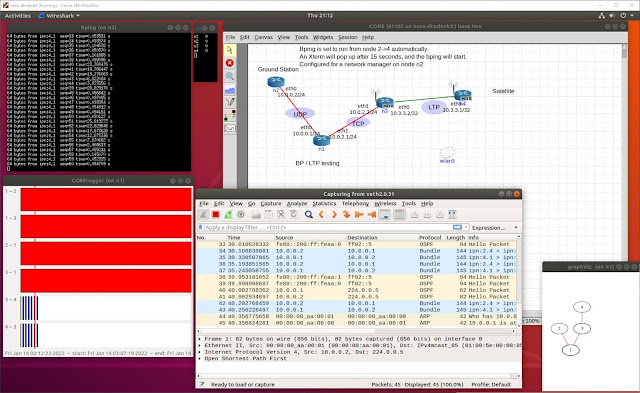
Now that I have a stable hardware and basic software platform running, I will be working in the actual DTN topology. This is very much a learning process for me as well, so I will be using a very interesting tool developed by the MITRE Corporation for an ION training course from NASA JPL.


I’m pretty sure that very soon I will be able to share some updates of what is happening at the InterPlanetary Networking Special Interest Group (IPNSIG), meanwhile if you want to learn more and join the conversation I have created a Facebook Group you can join.

Until the next inter planetary trip …

Cheers
Jorge


Friday, December 31, 2021

Building NASA's JPL ION on a Raspberry Pi

In my previous article you learned about the DTN-IPN R&D Lab project I’m working on, here I will start sharing how to build yourself a DTN node running NASA’s JPL Interplanetary Overlay Network (ION) protocol stack on a Raspberry Pi.

What do you need

  • A Raspberry Pi single board computer, I’d recommend at least a version 3B or better 3B+, if you have a Raspberry Pi 4 it will also work. On my prototype lab project, I have several ION DTN nodes running on the new Raspberry Pi Zero W2 which is about five times faster than the Zero W. I did build ION on a Zero W and it worked just slower.

  • A microSD card of at least 16GB and decent speed with the Raspi OS image. I did use one of the latest stable versions for this project, the 2021-05-07-raspios-buster-armhf.img, no need for the full version since it will take more space on the SD card.
    You can download this version from the link above and prepare the micro SD card using Win32 Disk Imager on a Windows machine.


  • Obviously for the initial setup you will need a keyboard and a monitor, and a mouse if you will keep working directly on the Raspberry Pi. I normally after the initial setup and with a network connection I access it remotely via VNC or SSH, not necessarily but I usually change the default username “pi”.

Here are the steps to obtain and build the ION version 4.1.1 code on your Raspberry Pi:

1- After you have your board up and running make sure that you do to have the latest packages installed in your system
    sudo apt-get update
    sudo apt-get upgrade

2- It will be most probably already installed but just in case also do
    sudo apt-get install build-essential

3- And automake to build the scripts to compile the source code
    sudo apt-get install automake

4- Obtain the ION 4.1.1 source code tar ball from SOURCEFORGE
We will do this with
wget on the Raspberry Pi


5 - Extract the ION source code distribution from the tar file.
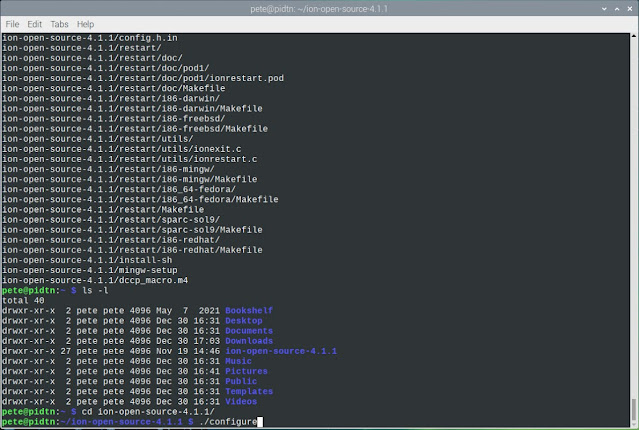
You will notice that now you have a new directory named ion-open-source-4.1.1, change to that directory and run the configure script with./configure


This will check all the dependencies and configure the files to build the ION software, you may see some warnings but the script should end without errors.
 
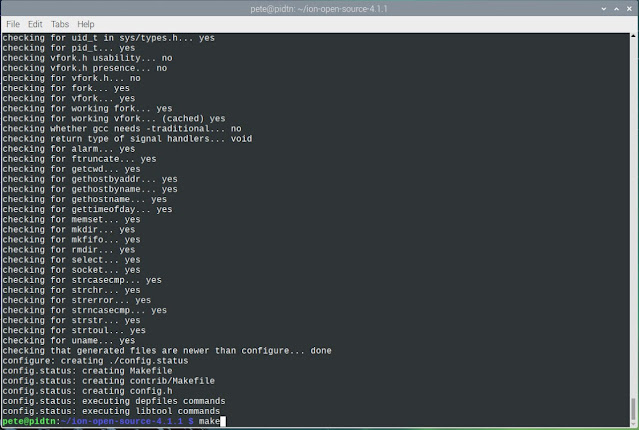
6- You are now ready to build the code with make


You will see the compilation process step by step going through each directory of the ION source code, be patient, the Raspberry Pi can do the job, but it will take several minutes to complete the building process, it really depends on the speed of your Raspberry Pi and the micro SD card, but even with the slower Raspberry Zero W the code builds without problems.
 
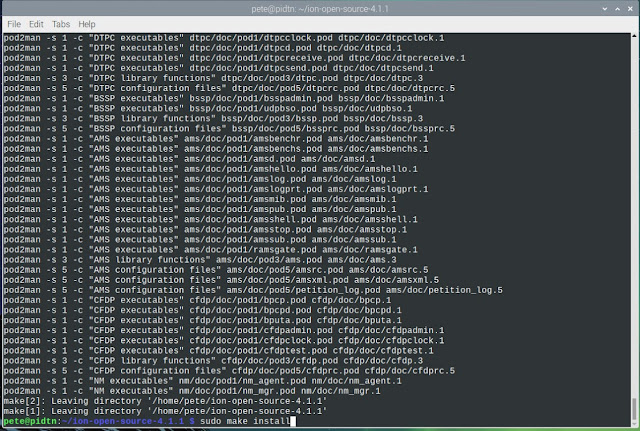
7- After everything is built you should see a screen like this one, now you are ready to install the software, but pay attention for this step you must use sudo make install to perform the installation as the user root


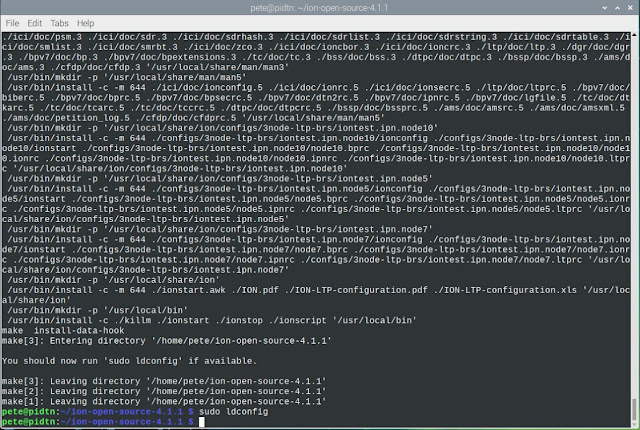
8- You will see some warnings but don’t worry about them

Given that the ION software uses dynamic libraries we must perform one more step as root to run the ldconfig tool to create the necessary links and update the cache of shared libraries.


Now we are ready to run ION 4.1.1 on the Raspberry Pi, but first we need to create the configuration/startup file.

The ION implementation is modular, there are several processes that must be started but the configuration can reside in a single file.

Since for now we have a single DTN node, the first test will be a loopback test sending data bundles to the same node.

Let’s create a directory named dtn and edit a file named localhost.rc, we will use 170 as our node ID.


For the LTP (Licklider Transport Protocol) section instead of an IP address we will use for now
localhost

For the Bundle Protocol we will declare LTP as the transport protocol, and define the input and output ducts (more about this soon.)

Your localhost.rc should look like this:

    ## begin ionadmin

    1 170 ''
    s
    # Contact plan definitions
    a contact +1 +86400 170 170 100000
    a range +1 +86400 170 170 1

    m production 1000000
    m consumption 1000000
    ## end ionadmin

    ## begin ltpadmin
    1 32
    a span 170 32 32 1400 10000 1 'udplso localhost:1113' 300
    s 'udplsi localhost:1113'

    ## end ltpadmin

    ## begin bpadmin
    1
    a scheme ipn 'ipnfw' 'ipnadminep'
    a endpoint ipn:170.0 q
    a endpoint ipn:170.1 q
    a endpoint ipn:170.2 q

    a protocol ltp 1400 100
    a induct ltp 170 ltpcli
    a outduct ltp 170 ltpclo
    s
    ## end bpadmin

    ## begin ipnadmin
    a plan 170 ltp/170
    ## end ipnadmin

    ## begin ionsecadmin
    1
    ## end ionsecadmin

In a future article I will go more into detail about the options for this file, meanwhile you can look at some additional documentation from Dr. Lara Suzuki.

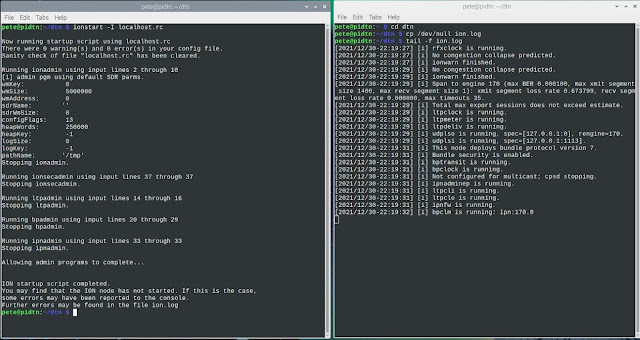
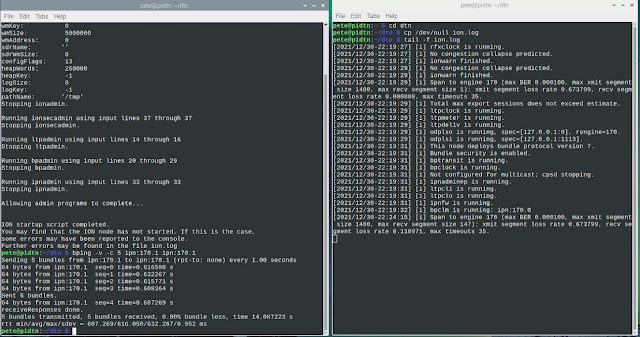
Now it is time to start the protocol stack with ionstart. It will create a log file named by default ion.log in the directory from where we launch ionstart. Since I want to see the log in action, I will create an empty ion.log file and run tail -f ion.log, and in another terminal window launch ION using ionstart with the -I option to include to config/startup file.

Here you can see both terminals side by side


Like for the Internet Protocol (IP) we have a similar tool to ping, for Bundle Protocol (BP) it is called bping 😊

When using bping we need to follow the naming scheme for DTN, telling the originating and destination nodes and endpoints, which is something like scheme:nodeID.endpoint. I will use my node ID in both cases ipn:170.1, the -v option to make it verbose and -c 5 to send just five bpings, here you go


Yeah you just did your first test running the ION DTN Bundle Protocol stack !!

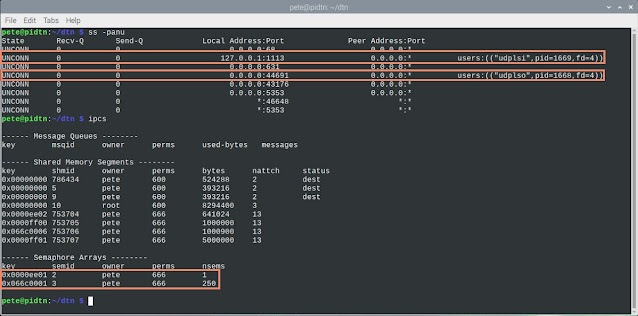
There are some tools that can help check the status of your DTN stack like ss to see the  active sockets, and ipcs for information on IPC (Inter Process Communication) facilities like  the mutex semaphores created by the Bundle Protocol stack.


You are one step closer to be able to communicate with space objects and other ION nodes.

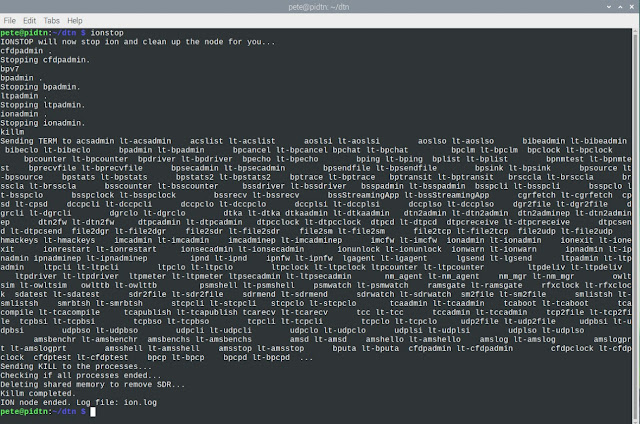
Like ionstart, there is a ionstop command to stop the ION protocol stack and kill all the associated processes.


In a coming article I will show how to create a Virtual Machine running Ubuntu Linux and build ION on it, then we will have two nodes to start exchanging messages using the Bundle Protocol.

Until then here is some reading material from Scott Burleigh the main author of the ION implementation of the DTN Bundle Protocol.

At the IPNSIG (InterPlanetary Networking Special Interest Group) soon to be Internet’sSociety Interplanetary Chapter, there are plans to have a test network where everybody will be able to participate and help testing DTN at a larger scale.

If you have questions please feel free to leave your comments below. As always, constructive feedback is welcomed.

Stay tuned for future updates, and if you are interested to exchange ideas and learn more you are welcome join the Inter Planetary Facebook Group and join IPNSG !!

Happy Networking and Happy New Year !!

Cheers
J
orge


Sunday, December 5, 2021

DTN-IPN R&D Lab Prototype Intro


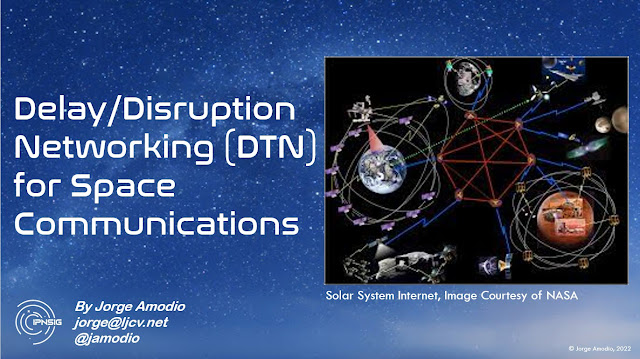
Image Courtesy of NASA

Since my early days tinkering with electronics, I always believed that one of the best ways of learning is by doing, getting your hands busy. My Mom (RIP) probably didn’t appreciate me taking appliances apart but over my long career in electronics, computer science and networking, I learned a lot by doing, and of course, reading any related materials, and during the past few years taking online classes.

I’m a byproduct of the Apollo era, I grew up fascinated with the space program, and my eyes were glued to our black and white TV when in 1969 Neil Armstrong set foot on the Moon. Yes, I dreamed about becoming an astronaut someday, but more than that, it cemented my inspiration to have a career in technology.

But this article is not about me, you can find more about me here.

Being a Pioneer Member of Internet Society (ISOC,) and my interest in learning more about space communications, during 2021 I joined ISOC’s Inter Planetary Networking Special Interest Group (IPNSIG.) 

After some exchanges with Vint Cerf, watching his TEDx presentation from 10 years ago about his vision and work on an Interplanetary Internet, participating in several remote conferences and webinars, reading a lot about it, and researching the evolution of new technologies for Delay-Tolerant Networking (DTN – RFC4838) and Bundle Protocols (RFC5050,) it got me thinking:

What can I do to learn more and share what I learn about these new evolving technologies?” … 

I came up with:

How about a low cost platform where we can tinker, experiment and do some development about objects communicating using DTN?” … 

One interesting fact about DTN is that it not only provides a way for networking in space, there are other applications that can take advantage of it, like IoT, battlefield communications, and many other scenarios where communications could be disrupted or delayed for various reasons .

While this is something that have been on the works for some time, it is still nascent technology, with lots of space for learning and experimenting, huge commercial and STEM educational opportunities, etc. NASA is already using it on an experimental basis for its Interplanetary Overlay Network (ION.)

Based on my previous experience developing embedded systems with microcontrollers and single board computers (SBC,) and inspired by NASA’s Artemis Mission to get back to the Moon, I started putting together what I call the IPN DTN Lab Protoype.
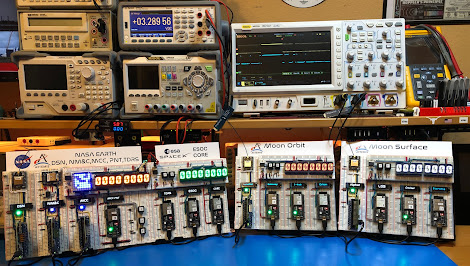
IPN DTN R&D Lab Prototype

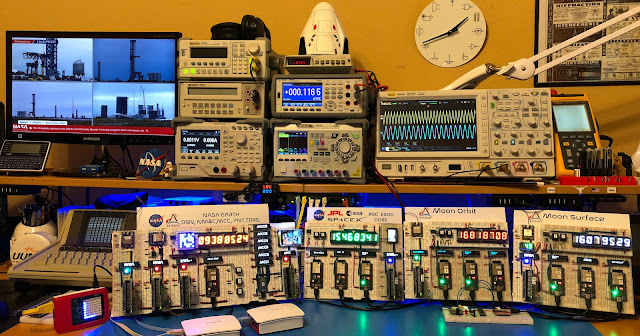
The IPN DTN Lab is a collection of various SBCs (Raspberry Pi Zero W2) and ESP32-S2 Dev Kits, combined with different type of displays, a couple low power LoRa transceivers, a simple GPS receiver, etc. The idea is that the platform can be used also to learn how to interface different type of devices to each of the boards, and how to use DTN and Bundle protocols to exchange data between them.

This is very much work in progress, I just finished to put together the first complete version of the hardware with some basic code running on each of the boards, which for now are all communicating via WiFi with TCP/IP, few of them include a LoRa transceiver module for low rate and long range wireless communication.

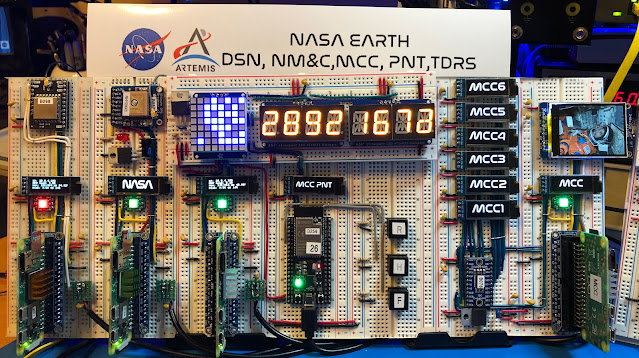
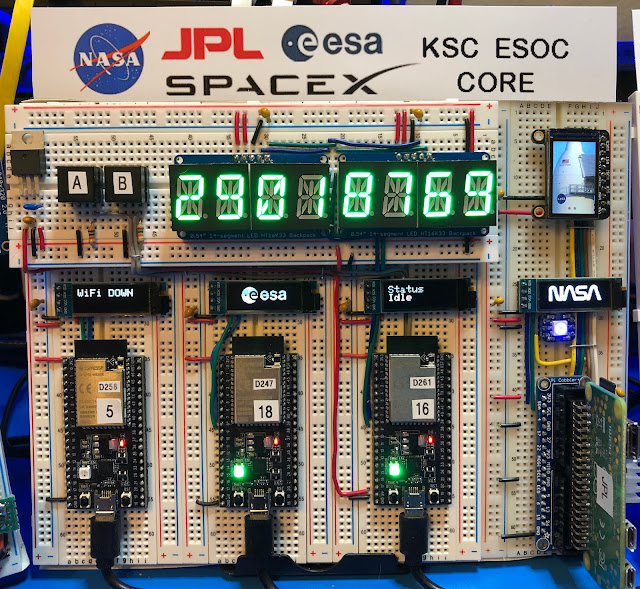
As said before, the design is inspired on the Artemis Mission, then there are three sections, one includes various nodes representing different facilities on Earth, such as NASA’s Mission Control Center (MCC,) NASA’s Deep Space Network (DSN,) NASA’s Tracking and Data Relay Satellite network (TDRS,) etc. Also, ESA’s European Space Operations Center (ESOC,) and SpaceX CORE (Crew Operations and Resource Engineering.)
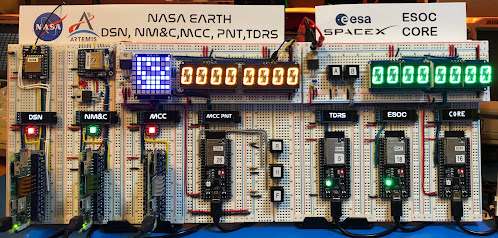
IPN DTN Lab - Earth Section

The second section represents various object that will be in Moon’s Orbit, like NASA’s multi-purpose orbital outpost Gateway, ESA’s I-Hab expansion module for Gateway, NASA’s Orion Capsule, etc.
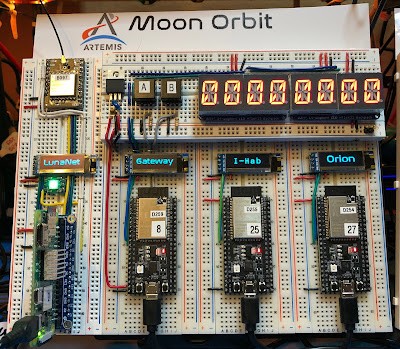
IPN DTN Lab - Moon Orbit Section

And the third section represents various objects that will be in the Moon’s surface, such as NASA’s Lunar Ground Station (LGS,) SpaceX’s Starship Moon Lander, and JAXA’s pressurized Lunar rover being developed with Toyota aka Cruiser.
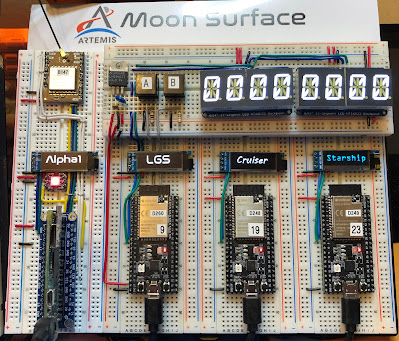
IPN DTN Lab - Moon Surface Section

All the nodes feature a small 128x32 pixels OLED display, some of them include also a pair of four-digit alphanumeric LED display, and at least one RGB LED (NeoPixel.) On this version, five of the nodes are implemented with Raspberry Pi Zero W2 boards, three of them include a low power LoRa transceiver for long distance wireless communications. One of the Raspberry Pi Zero W2 boards is interfaced with a small GPS receiver module with the option for an external antenna for better reception.

The role of each node can be changed just by software. For example, this is one of the Raspberry Pi’s getting GPS data from another node via the network.
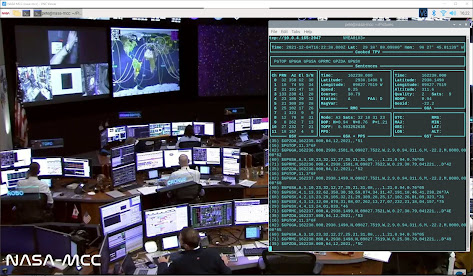
IPN DTN Lab - MCC node screen capture

The design is completely scalable, and more nodes can be added to expand the network.

As said before this is very much work in progress. Being now the hardware development phase stable, I will be focusing on the software, bringing up the Bundle Protocols for communication, some demonstrations and documentation. 

When people ask when it will be all ready, I always use the classic response from Elon’s Musk … “Two Weeks” 😊

I’m in the process of putting together several presentations and classes, a summary paper, various videos, etc.


I will be providing more details, and regular reports how the project progresses in future posts, stay tuned.

If you are interested to learn more about this, feel free to contact me, if you have ideas or constructive feedback feel free to leave a comment.

If you are interested in providing funding for projects like this, definitely contact me !!

Signing off for now from planet Earth

Cheers
Jorge

Sunday, January 22, 2012

Megaupload, Piratería y Cambalache Netero


Casi imposible en estos días abrir una página de web de noticias, redes sociales o chequear mi correo electrónico y no encontrar ninguna referencia, artículo o comentario sobre el tole tole con MegaUpload.

Pese a que no es uno de los temas de mi mayor interés, pero tiene que ver en parte con mi participación en distintos foros para promover el libre intercambio de información en Internet, y que no me gusta hablar por boca de ganso, me dediqué a explorar y leer un poco más sobre los detalles de esta acción por parte del Departamento de Justicia de los Estados Unidos, incluyendo la lectura detallada de las 72 páginas de la Acusación (Indictment) emitida por dicho Departamento.

Algunas aclaraciones de rigor. Me interesa poco o nada defender a las compañías disqueras, a las megacorporaciones, a los estudios cinematográficos, al DOJ, FBI o cualquier otra agencia o institución de tres letras. Sí, me interesa seguir promoviendo la libertad de expresión, el libre intercambio de información en Internet y la menor intromisión de los "manda más" de acá, allá y del más allá también. Así que comentarios o sanatas sobre el imperialismo yanqui, los malvados de la disquera X o distribuidora Y, están de más y al dope.

Para un dinosaurio de la red como yo, quizás situaciones y eventos como estos hacen reflotar viejas anoralgias (añoranzas llenas de nostalgia) sobre lo tranquilo que era la red y como podíamos dejar información sin preocuparnos de robo de identidad, o si algo no funcaba llamábamos a nuestro "amigo" al otro lado de la línea para resolverlo sin necesidad de pedirle permiso al Tío Sam o garparle a un abogado.

Claro, pese a que de alguna forma nos rebuscabamos para tener un dialogo interactivo vía IRC, Talk, o hasta video con CU-SeeMe, nada como las videoconferencias que puedo tener hoy en día con familiares, amigos y colegas alrededor del mundo o el inmenso caudal de información disponible en línea para mi trabajo o regocijo.

Internet ha crecido de tal forma que hasta muchos consideran el acceso a la misma un derecho humano, erróneamente en mi opinión pero sin restarle importancia a como Internet ha cambiado muchos de los aspectos de nuestra vida cotidiana, no solo la posibilidad de comunicación o comercio, sino también la forma en que socializamos.

Es ilógico el argumentar o insistentemente apuntarle el dedo a Internet como el medio o causa principal de muchos males. Si bien es cierto que en cierta medida facilita el crimen, no significa que sea la causa, y la confusión y zona gris que genera este tema, complicado con el hecho que en Internet no existen fronteras, motivan acciones desmedidas (como incautar cientos de servidores a lo bestia) o propuestas de ley - como SOPA - que intentan poner control por medio de interferir con la arquitectura y funcionamiento de la red. (SOPA proponía algo así como borrar los nombres de las calles en los carteles de cada esquina para que los chorros no supieran como llegar al banco para afanar.)

Algunos parecen ver la piratería en Internet como una causa noble, leyendo los comentarios en un sitio de noticias me cruzo con un tarado (con nombre y apellido) que afirma tener más de 7 Terabytes de películas y música pirateados, y ahora se la pasa distribuyendo por varios lados incluyendo Facebook y Twitter, enlaces para generar ataques a varios sitios en Internet. Verdaderamente, a tipos como éste aparte de pedirle el documento, deberían hacerle un análisis de sangre y orina antes de darle su cuenta para poder acceder Internet.

Julian Sanchez publicó un artículo muy interesante en ars technica sobre SOPA, Regulación en Internet y la economía de la piratería, donde afirma que a la industria de contenidos seguramente algo le cuesta la piratería -sino no meterían tanta guita en el Congreso para promover legislación como SOPA. Pero realmente la reducción en piratería que esto puede generar seria mínima y con un alto costo para todos.

Ahora la operación de MegaUpload era legal o no ? A primera vista el negocio sonaba como bastante legal, simplemente un megarepositorio público de archivos en la red. Pero eso es lo que se veía de frente, ahora empiezan a saltar en detalle como operaban estos quías, realmente al borde o más allá de la ley.

Varios argumentan que el accionar de la justicia fue una movida para promover legislación como SOPA. En realidad el argumento va para el otro lado, este accionar es clara demostración que la justicia bien o mal no necesita de SOPA para tomar acción. Por otro lado los de MegaUpload estaban bajo la mira y el microscopio bastante antes de que se escribiera la propuesta de ley.

Es Pepe DOTCOM culpable ? Realmente no soy juez para determinarlo, lo que sí creo después de ver unas cuantas fotos, el hacerse llamar DOTCOM, en las chapas de su vasta colección de autos poner cosas como GOOD, EVIL, GOD, STONED, GUILTY, MAFIA y otros detalles más, resulta muy sospechoso. Muy boludo no es, porque en el 2010 encanutó algo así como 42 palos verdes. El que sí parece ser medio boludo es el pobre programador que estaba en Turquía que en el mismo año se conformó con solo 100 lucas.

Lo que sí es perjudicial para Internet en casos como MegaUpload, es que en primer lugar ponen en movimiento a las autoridades para tomar medidas extremas que con el afán de hacer justicia y aplicar la ley entran como elefante en un bazar arrasando con todo.

También afecta que empresas que actúan de esta manera le dan más motivos y combustible a quienes quieren forzar y promover más regulación en la operación y uso de la red.

Lamentablemente también pone en duda el desarrollo y adopción de ciertas tecnologías como el almacenamiento remoto de información en "la nube."

Mi esposa es artista, y yo hago desarrollo de sistemas electrónicos, la piratería nos afecta cotidianamente.

Después de leer unos cuantos comentarios defendiendo la piratería como algo noble me pregunto si al final Discépolo tenía razón y seguimos en el Cambalache, y "El que no llora, no mama, y el que no afana es un gil!".

Atentos Saludos
Jorge (el gil que sigue garpando por música y películas)

Tuesday, January 25, 2011

Contacts network visualization via LinkedIn InMaps

When I worked in large scale networking, to have a clear understanding and view of the overall network architecture it was always helpful, and in my opinion a very good practice, to put together high level topology maps, just a simple graph showing how each of the most relevant nodes in the network were physically and/or virtually connected to each other.

Visualization is a very powerful tool when you have to deal with a complex and large number of "relationships", it helps by giving you a graphical representation on how those relationships are interrelated and in which sections of the graph you need to increase or sometimes decrease the number of connections, it also helps to identify single points of failure or choking points, and drives one to make better decisions.

With the advent of the new social and professional contact network online services, such as LinkedIn, managing your contacts and how them become part of your relationships universe became much easier. I often had to dig into my memory to find where I met this person or how we got to know each other, and if by any chance her or him knows somebody else I know or I'm interested to know.

Yesterday LinkedIn posted on their blog How to Visualize your LinkedIn network with InMaps, it sounded pretty interesting and it looked very cool, so I gave it a try .... here is my InMap


Nice !! At first glance it's clear that my contacts at LinkedIn are segmented into groups with a little bit of clustering and some lines between groups.

But if you take a closer look, you will notice on the top a group of contacts in orange which represent very interesting people from the Social Media arena that I met in a recent past. This group of people obviously today rely a lot on Internet applications like Twitter, Facebook, LinkedIn, blogs, etc, to build relationships and communicate, but the map shows something very clear, from the ones that I know and are in my contacts list, there are almost no relationships with my contacts in blue (heavy honchos of IT and Telecom) or in pink (Internet development and policy making).

This means that I've a huge potential to serve as a bridge between my Social Media contacts and the other two groups.

By knowing in advance a little bit of what is on each side of the bridge I may now be able to identify common matters that may help to have better representation of Social Media in Internet policy development forums, and have this particular group get to know more about Internet infrastructure.

The power of information it is not just collecting mountains of it, but how you mine, digest, represent,and visualize it, in this case literally "connecting the dots" to help you make more informed and effective decisions.

If you are a LinkedIn user with at least 50 contacts give it a try.

Nice job LinkedIn ... two thumbs up !!

Cheers
Jorge
Sunday, October 10, 2010

My first tweetup

I've heard in the past the use of the word tweetup, one of my preferred definitions for it is the organized or impromptu gathering of Twitter users. I always thought about it as a bunch of kids coordinating via twitter where to hang out on a given night.

There is no doubt that many of the Social Networking tools that take advantage of the reach and ubiquity of the Internet have changed how we establish and develop new relationships and how we let others know more about us (in some cases much more than we want or think we are making public, thanks to lax privacy settings).

Many years ago I joined LinkedIn, I thought it was a good tool to keep all contacts in a single place and keep them updated, so if Joe goes to work for another company or moves to Mars I'll have (if he lets me) the latest contact info and updates about his whereabouts.

I don't remember exactly when I created my Facebook and Twitter accounts, but lets say it was more than two years ago, initially I didn't care to search for friends or old colleagues and classmates, it was until like a year later that I started to follow some folks in twitter and get annoyed by the constant updates, quizzes and stupid games in Facebook.

At the beginning I found that twitter was very disruptive, it took me a while (and I've been dealing with email since the early 80's) to control the habit to check email every few minutes and now I've got this little bird chirping every few seconds. But at some moment there was an inflection point, and that was when I installed the Seismic Twitter App on an Apple iPod touch. I was already using the iPod touch to keep an eye on email and as a last recourse ssh terminal, ohhh yes and to listen to music. But now with the twitter app I was able to read and send tweets when I was not at my desktop working, even on the road when I was able to get WiFi access (I'm not an SMS kind of guy and texting from a regular cellphone keypad is a pain in the neck), then I started following people and being followed.

I don't take twitter as a very serious communication channel, so I may once in a while tweet a brain fart, some ironic joke or acidic comment, but also share a good laugh with local and remote friends and family.

I'm not anti-social but in many situations I've to pass the shy-geek threshold to become social, my wife keeps telling me that I need to socialize more and get out of my cave (office) and meet new people.

One event that got me very excited and ready to get out of the cave is that on October 16 we'll have in San Antonio our first edition of TEDx, then I was exchanging few tweets and emails with Rob La Gesse (@kr8tr) who works at Rackspace which is one of the major sponsors for TEDx San Antonio. Rob mentioned that Robert Scoble (@Scobleizer) was going to be in town and that they were planning a tweetup for Friday night (October 8, 2010).

Being one of the most active technology bloggers and noise makers, I've been following Scobleizer for a while, I thought that may be interesting to meet this guy who happens to have over 143,000 followers in twitter and became sort of a tech social media celebrity.

Rob mentioned that also Rocky Barbanica (@RocmanUSA) who has been Robert's producer for long time was going to be at the tweetup and many other interesting people, both Robert and Rocky now work for Rob at Rackspace and they are the major driving force behind a project called Building 43. Rob's primary mission at Rackspace is to help customers and startup companies even if they are not Rackspace's customers, and seems that they give him a great deal of slack to do whatever he thinks must be done to follow that mission.

Then I received the invitation and discovered another service (twtvite.com) that I didn't have a clue it existed, and showing what other twitter users where planning to assist.

At this time my shy-geek threshold was blown away and I was more than ready to show up at the tweetup. I was feeling like in my old days of ham radio amateur operator going to a hamfest or radio club gathering.

I arrived few minutes earlier and Robert Scoble, Rocky, Bruce Hughes (@jbhughes), and few others were waiting for some snack food and sharing beers, soon after Rob arrived and we started talking, it was almost instantly that I realized that the "Helping Startups mission" was no BS, and my shyness was totally gone and started talking about what I've been doing and I'm doing now (which involves a very exciting startup project of which I'll write something in the near future), we talked about technology, company funding, beer, food, later Chip (@ChipLaFleur) arrived who just moved into San Antonio from Michigan, then others started to show up, like Jennifer Navarrete (@epodcaster) who is sort of Lady Podcasting in San Antonio, and a very avid Camp organizer.
Bruce, Chip & Jorge

For a moment I was teasing Matthew Egan (@ImageFreedom) about SEO (Search Engine Optimization), he does SEO Consulting and I always found those SPAM emails offering that type of service very annoying, but talking with him and also with Ryan Kelly (@pearanalytics) from Pear Analytics I realized that some of these folks take it very seriously and it is not only a question of having a better placement on search engines than having a better and more reliable website for your customers or followers.


Everything went so fast, it was not a very large group but the conversations were so interesting that time was flying much faster than I expected, and then I met Nan Palmero (@nanpalmero), what a great and energetic guy, and since he was born in Uruguay across the river from Buenos Aires where I was born we increased the transfer speed of the conversation switching between spanish and english, he  is one of the officers of TheBMPR another social media community oriented to business, media and public relations.


Didn't have much time to take more pictures, I think Jen took some, but couldn't resist to at least have one with the big guy that even when he is getting bombarded with updates from more than 23,000 people he is following, he can put aside his iPhone and have a great conversation with you.
Robert Scoble and Jorge Amodio
Thanks again Rob for the invitation and for making it happen, and even when tweetups normally don't need or have big sponsors, thanks Rackspace for let them make it happen. And obviously a big thanks to all that participated, it was a real pleasure to meet all of you and have a chance to socialize out of the cave.


It was a fantastic experience and now I'm looking forward to the next one.


Cheers
Jorge